
Storage and Blender Projects
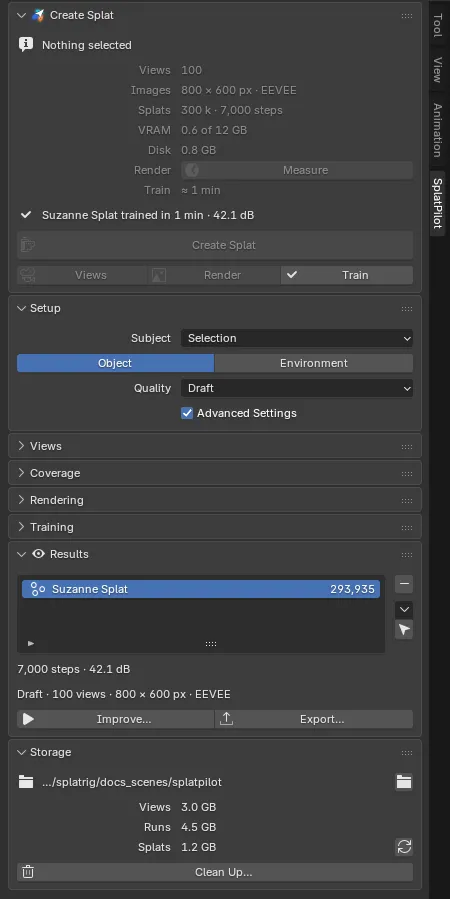
SplatPilot writes three kinds of files: the rendered views, the training runs (logs, previews, checkpoints) and the trained splats. They live in one storage folder per file or project. The Storage panel, the last in the SplatPilot tab after Results, shows where and how much.
Where the files go
Section titled “Where the files go”| Your file | Storage folder |
|---|---|
| Inside a Blender Project | splatpilot in the project’s folder, or the folder set in the project setting splatpilot_root |
| Saved, outside a project | splatpilot next to the .blend file (//splatpilot/) |
| Not saved yet | SplatPilot’s cache in Blender’s user folder, until you save: then it moves into the real folder |
Paths in your .blend are kept relative to it, so moving a project folder (or a .blend together
with its splatpilot folder) keeps everything working.
What is inside
Section titled “What is inside”| Folder | Holds | Safe to delete? |
|---|---|---|
datasets/ |
Rendered views, one folder per scene and settings | Yes: SplatPilot renders them again when needed, which takes time |
jobs/ |
Training runs (logs, previews, checkpoints) and render logs, one folder per run | The runs no splat needs: Clean Up removes them. Improve trains a splat on from its checkpoint here |
results/ |
Trained splats, each with a .json of what it was made with |
Keep them |
presets/ |
Quality presets shared in a Blender Project (only there) | Keep them |
A README.txt in the folder says the same. If the folder lies in a Git repository, SplatPilot also
writes a .gitignore that leaves out datasets/ and jobs/.
A splat in your scene does not need these files to display or render: its data is part of your
.blend. They matter for working on it further: Improve needs its checkpoint in jobs/ and
its views in datasets/; Train Again and Export Training Dataset need its views.
Trained files in results/ are named after the splat and the time its training started, such
as Suzanne_Splat-20261009-021345.ply, with the splat’s recipe beside it as a .json file of the
same name. See What a splat records.
Inside a rendered view folder, images/ holds the views as pictures and exr/ the data training
reads: linear colour and every pixel’s position and normal. Blender 5.3 cannot open those
multi-part EXR files; other EXR viewers show their rgba layer.
Shared views. A view folder is named after the scene and a key of its views and settings.
.blend files that share a storage folder and render the same scene the same way use the same
rendered views.
Temporary copies. When your file has unsaved changes, SplatPilot renders from a copy saved next
to it, named .<file name>.splatpilot.blend, and deletes it afterwards. Where the file’s folder
takes no copy, the copy goes in the job’s folder.
Disk use
Section titled “Disk use”The Storage panel shows what the storage folder holds in three rows, Views, Runs and Splats, each with its size, such as “1.2 GB”, “273 MB” or “340 KB”, counted for every file that shares the folder. An empty folder reads “0 KB”. SplatPilot counts in the background: once a session, after every job, after Clean Up, and on the refresh button at the end of the Splats row. Meanwhile a Disk Use row reads “Counting…”.
The path at the top is shortened to its last folders. Open Storage Folder (the folder icon beside it) opens the storage folder in your file manager; its tooltip gives the full path.
When the drive of the storage folder has less free space than the views of the current settings need, and they are not rendered yet, the Create Splat panel shows an alert above its button: “Not enough disk space: about 2.3 GB needed, 1.1 GB free”.
Clean Up
Section titled “Clean Up”Clean Up… deletes what no splat in this file needs. A dialog shows how many folders and how much space each kind takes:
- Training Runs (ticked by default): logs, previews and checkpoints of trainings whose splat is not in this file.
- Rendered Views (not ticked): views no splat in this file was trained on. Rendering them again takes time, and in a project other files may use them; the dialog reminds you.
Clean Up always keeps what running or paused jobs use, the training runs of other .blend files
that share the folder, and trainings waiting to be imported. When there is nothing it could
delete, the button is greyed out, and its tooltip says why.
Blender Projects
Section titled “Blender Projects”Blender 5.3 introduced Blender Projects: a folder that Blender recognises as a project, for files a
team works on together. Inside a project, SplatPilot keeps everything in a splatpilot folder in
the project’s folder, shared by all its files:
- Add to Project Settings (in the Storage panel) adds a project setting named
splatpilot_root, a file path with the value{project_root}/splatpilot, and saves the project. Your team can then move SplatPilot’s storage elsewhere in Blender’s project settings. The button disappears once the setting exists. - Shared presets: quality presets saved with Share with Project go to the project’s
presets/folder, where everyone on the project finds them. See Quality and presets. - Shared views: files of the project that render the same scene the same way share their rendered views.
Blender Projects are new in Blender 5.3 and Blender plans to extend them, so details may change.