
Preferences
Open Edit > Preferences > Add-ons and expand SplatPilot. Blender’s own block at the top shows its name, version, tagline and website. Below it, Documentation and Get Help link to this site once it is online.
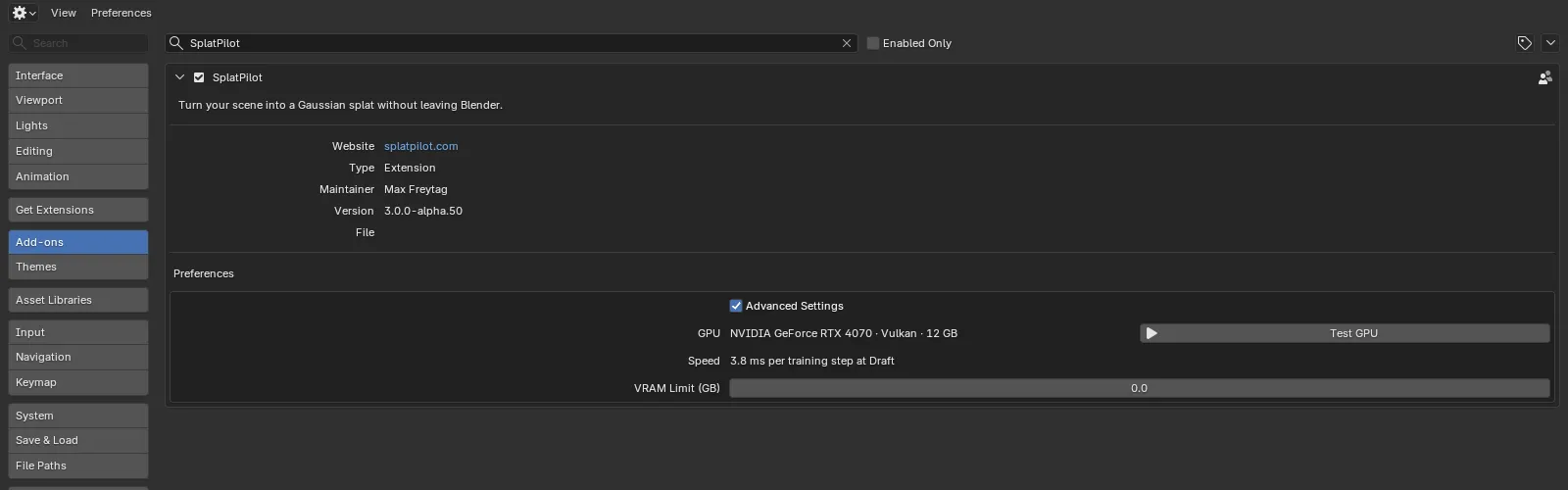
| Row | Shows |
|---|---|
| Advanced Settings | Shows the settings most captures leave as they are in the sidebar’s panels; the same switch as in the Setup panel. See Advanced Settings. |
| GPU | The GPU SplatPilot trains on, the graphics API and, on NVIDIA cards, its memory, such as “NVIDIA GeForce RTX 4070 · Vulkan · 12 GB”; “Not tested” before the first test. Test GPU beside it; “Testing…” in its place while the test runs. |
| Speed | After a test: how long one Draft-sized training step takes, such as “3.9 ms per training step at Draft”. |
| VRAM Limit (GB) | The GPU memory above which the estimate warns; see VRAM Limit. |
Test GPU
Section titled “Test GPU”Test GPU runs a short training on the GPU that SplatPilot uses and fills in the GPU and Speed rows.
The test does three things:
- It tells you which GPU trains and how fast it is.
- It prepares the engine’s shaders, which the very first training would otherwise do (a minute or two at “Preparing the engine…”).
- It gives the estimate in the Create Splat panel your GPU’s speed, so its training times fit your machine from the start. Every finished training refines them further. On NVIDIA cards, the estimate’s VRAM row then shows the training’s VRAM out of the card’s, such as “0.6 of 12 GB”.
The test is not available while something renders or trains, because it would time both: the tooltip says “A render or training is running: it would time both”.
VRAM Limit
Section titled “VRAM Limit”VRAM Limit (GB) makes the estimate warn when a training would need more GPU memory than this. The warning comes with a button that lowers Max Splats to the largest budget that fits. 0, the default, never warns.
On NVIDIA cards, Test GPU fills in the limit for you if it is 0: the card’s memory less 1.5 GB, to leave room for Blender’s own drawing. You can change it at any time.
Without the training engine
Section titled “Without the training engine”If the engine is missing, the preferences show two lines instead of the rows: “Engine missing (slangpy): reinstall SplatPilot to train” and “Rendering and dataset export work without it”. File > Export > Splat Training Dataset exports the rendered views for Postshot, LichtFeld Studio and other trainers.