
The Create Splat panel
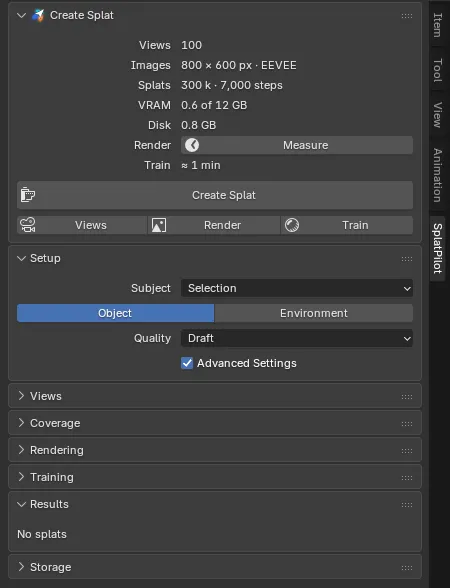
Create Splat is the first panel in the SplatPilot tab of the 3D Viewport’s sidebar (N). It holds the run: what the settings will cost (the estimate), Check Before Rendering, the status line and the buttons. The settings follow in panels of their own: Setup, open by default, with what to capture and how well (Subject, Kind, Quality), then Views, Coverage, Rendering and Training, closed by default. Results and Storage are last.
The estimate
Section titled “The estimate”At the top of the panel, the estimate’s rows describe the run before you click:
| Row | Shows | For example |
|---|---|---|
| Views | How many views will be rendered, and the geometry views an environment renders as well. When coverage decides an environment’s count, the range; the other rows are then for its top end | “100”, “Auto: 50–200 + 500 geometry” |
| Images | The views’ size in pixels, and the engine that renders them: the scene’s render engine, or Cycles when that is neither Cycles nor EEVEE (see Engine) | “800 × 450 px · Cycles” |
| Splats | The splat budget and the training steps, the geometry views’ share included | “300 k · 7,000 steps”, or “300 k · 11,667 steps” with geometry views |
| VRAM | GPU memory for the training. Once Test GPU found your card’s memory, out of how much | “0.6 GB”, “0.6 of 12 GB” |
| Disk | Disk space for the rendered views | “0.8 GB” |
| Render | The render time: a Measure button until it is measured, then the time, with a refresh button | “12 min”, “3 min – 12 min” |
| Train | The training time | “≈ 8 min”, “≈ 3 min – 8 min” |
| Time | Render and training together; only once the render is measured | “≈ 20 min”, “≈ 11 min – 20 min” |
For an automatic count, Render, Train and Time give a range from the fewest to the most views. Durations of an hour or more read “1 h 05 min”.
When there are no views to count, the Views row says why: “No rig used” or “No perspective cameras”. When there is nothing to splat, a line above the rows says why, such as “Nothing selected”, and the rows are greyed out (see Subject).
Measuring the render time. Measure (the operator Measure Render) renders two views with your settings, and two geometry views in an environment, and from then on knows how long your scene takes to render. While it runs, the Render row reads “Measuring…”. The refresh button at the end of the row measures again, for example after you change the scene.
A measured time holds for the render settings it was measured with (engine, samples, image size): change them and Measure shows again. For a saved file, measured times are kept in SplatPilot’s user cache, so they are still there when you open the file again; they are this machine’s times, not the file’s. While something renders or trains, Measure is greyed out (“A render or training is running: it would time both”), and starting a run stops a running Measure.
Training time comes from your GPU’s speed, as Test GPU in the preferences measured it, or as your last training showed.
Alerts
Section titled “Alerts”Three alerts show in red above the Create Splat button:
| Alert | Shown when |
|---|---|
| “Over the 8.0 GB VRAM limit”, with a button such as Use 650 k Splats | A VRAM limit is set and the training would need more. The VRAM row turns red too; the button lowers Max Splats to the largest budget that fits. |
| “Not enough memory: about 20 GB needed, 10 GB free” | The render copy of the scene would likely need more memory than the computer has free. See Troubleshooting. |
| “Not enough disk space: about 2.3 GB needed, 1.1 GB free” | The drive of SplatPilot’s storage folder has less room than the views need, and they are not rendered yet. See Troubleshooting. |
The memory and disk alerts are not shown while this scene renders or trains.
Check Before Rendering
Section titled “Check Before Rendering”Under the estimate, Check Before Rendering (n) opens the Before Rendering popover. It shows when something in the scene is worth a decision before the views render, and n counts those things: the mirror-like materials (as one), Cycles rendering on the CPU, and each render setting that can be kept or is noted. Render settings the views always leave out are listed in the popover but not counted: there is nothing to decide.
The popover has a box for each kind of decision:
| Box | Shows | Action |
|---|---|---|
| Materials | The subject’s mirror-like materials while Min Roughness is 0, for example “Mirror-like: Chrome, Gold and 2 more · sharp reflections come out blotchy” | Set Min Roughness to 0.3 sets Rendering > Min Roughness; the views render anew. See Shiny surfaces. |
| Device | “The views render with Cycles on the CPU (the scene’s Device) · GPU Compute renders them several times faster”. Shown when the views render with Cycles, the scene’s device is CPU and your preferences have a GPU set up | Use GPU Compute sets Render Properties > Device to GPU Compute, for F12 too. Geometry views and coverage checks use the GPU either way. |
| Left out of the views | Render settings the views always leave out: the scene’s value, the views’ value and why | |
| Left out unless kept | Render settings the views leave out unless you keep them | Keep renders the views with the scene’s setting. |
| Unchanged | Settings the views take as they are but that cost detail | Change them in Render Properties or on the camera. |
The render settings in each box:
| Box | Settings |
|---|---|
| Left out of the views | Burn Into Image (metadata stamp), Render Region, Sequencer strips, Stereoscopy, White Balance, an output colour override, View Layer Samples, Time Limit, a Box pixel filter |
| Left out unless kept | Material Override and World Override (view layer), Freestyle, a Noise Threshold coarser than 0.05, a Fast or None denoising prefilter |
| Unchanged | Simplify limits (subdivision, texture size, culling); with Source: Cameras, cameras whose Clip End cuts the subject |
Detail the views do not get, the splat cannot learn. Keeping a setting renders the views anew, under a dataset name of their own. The Rendering panel’s Scene Render Settings shows the render settings at any time, also when none of them counts.
The buttons
Section titled “The buttons”Create Splat does the whole job: places the views, renders them and trains. The three buttons below it do one step each:
- Views places the views without rendering them; an environment renders its geometry views first. The views show in the viewport and the Views panel.
- Render renders the views (placing them first if needed), then stops.
- Train trains a new splat on the views rendered last, with the current Training settings.
Each step reuses what an earlier step made for the same settings. See How it works.
When a step cannot start, its button is greyed out and its tooltip says why: the subject’s reason (see Subject), “No rig used” or “No perspective cameras”. Views is also greyed out with Rigs and Cameras, whose views show in the viewport already. Train is never greyed out: it trains on the views rendered last, and says so when there are none (“No views rendered for this subject and these settings”).
A run keeps the settings of its click. Create Splat takes SH Degree, Opaque Splats, Focus Detail (with the focus points), Preview Every and Sky Dome when you click it. Changing them while the views render applies to the next run, not to this one.
In a heavy environment, planning the views can take a while. The panel then shows a progress bar, “Planning views 12 / 32” (or “Planning geometry views …”), and Blender’s status bar says “Esc: cancel planning”. Before it has counted anything, the panel reads “Planning the views…”. The viewport can be orbited meanwhile; Esc cancels.
Where each step stands
Section titled “Where each step stands”Views, Render and Train show whether their step is done for the current settings:
| Button shows | Means | Its tooltip adds |
|---|---|---|
| A check mark in place of its icon | Done for the current settings | “Placed for the current settings”, “Rendered for the current settings”, “A splat of them has the current settings” |
| Red | Done for other settings. A click makes it anew for the current ones | “The placed views are for other settings”, “The views rendered last are for other settings”, “Their splats have other training settings” |
| Plain | Not done |
- Views compares the placed views with the views it would place now. A setting that moves the views turns it red. Placed views of other settings are drawn faint in the viewport, and their part of the Views panel is greyed out.
- Render compares the views rendered last with the views it would render now: their placement and the render settings.
- Train looks for a splat in the scene trained to its planned steps on the views rendered last. It turns red only when its own settings changed: Steps, Max Splats, SH Degree, Opaque Splats other than the kind’s own, or Focus Detail with the focus points. A paused or stopped training does not count, nor does a splat grown with Improve’s Add Views. While Render is red, Train shows no check mark and its tooltip adds “They are for other settings”: it trains on the views rendered last.
Files saved with alpha.39 show the three buttons plain until their views are placed or rendered again.
While it runs
Section titled “While it runs”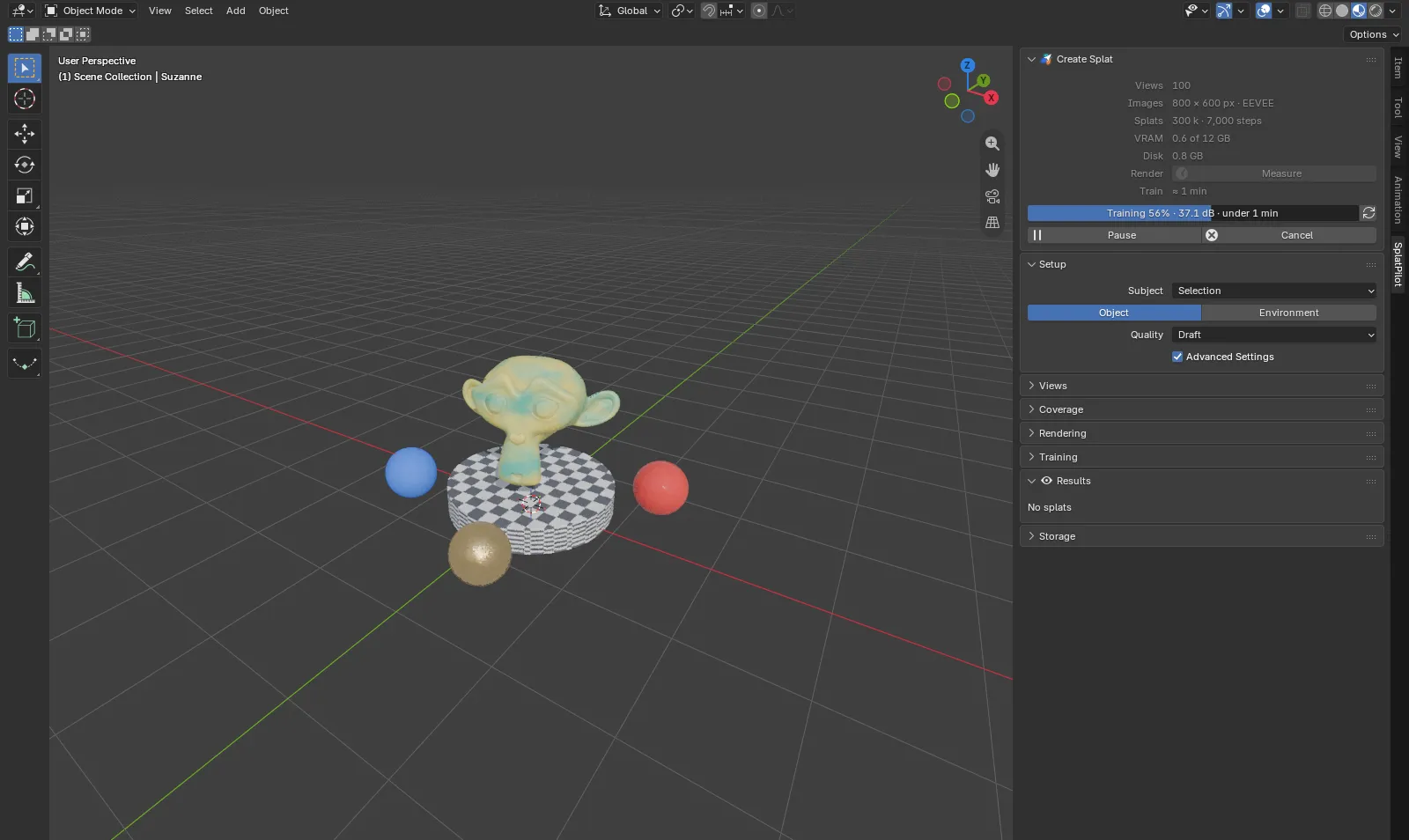
A progress bar shows the stage and how far it got: “Rendering 40 / 100” with the time left (and “Geometry views 40 / 500” for an environment’s geometry views), “Choosing views” while an environment picks its views, “Checking coverage” in a coverage check’s last stage, then “Training 57%” with the score so far and the time left. When a run has several stages, they are numbered, such as “2/3”.
While a run renders and more stages follow, a line under the bar gives the time left in all and when the run should end: “2 h 40 min left in all · until ≈ 23:40”. It counts the running render at its pace so far, without the first view (Blender prepares the scene during it), and then what the run does next: the colour views after the geometry views (their measured render time; until Measure has timed them the line waits for them to start, since the geometry views’ pace says nothing about theirs), a coverage check’s reference views and its measuring, and the estimated training when the run trains. Views, Render and Check Coverage add no training. In the last stage, the bar’s own time is the time left.
| Button | What it does |
|---|---|
| Pause | Stops now and keeps everything done so far. Resume goes on from there: it renders the remaining views, or trains on to the planned steps. A paused training’s splat so far is in Results meanwhile. |
| Cancel | Ends the run. A training’s splat is discarded; rendered views are kept and reused, so a new Create Splat starts training right away. When a training has run for 5 minutes or more, Blender asks first: “Discard the training?”, with the minutes of training that are lost. |
| Refresh (at the end of the training’s progress bar) | Shows the splat in the viewport as it is now. |
After a pause, the big button reads Resume, and Start Over below it drops the paused run and starts Create Splat again with the current settings. After a paused coverage check, it reads Resume Check, and Create Splat stays below it as usual.
When a run ends, the status line says how.
In the status bar
Section titled “In the status bar”While this scene renders or trains, Blender’s status bar shows SplatPilot’s icon, the progress in short, such as “Training 57%” or “2/3 Geometry views 40 / 500”, and a Cancel button (an icon). It cancels as the panel’s Cancel does, and asks the same way after 5 minutes of training. Nothing shows while the scene is idle.
The status line
Section titled “The status line”One line above the Create Splat button says how the last run went, or what needs you:
| Shows | For example | Stays until |
|---|---|---|
| A failure, with Open Log at its end | “Rendering failed: the render copy of Blender crashed”, “Training failed: … · checkpoint at step 12,000” | The next run starts |
| A pause | “Paused after 40 of 100 views”, “Suzanne Splat: paused at 4,200 of 7,000 steps”, “Coverage check paused after 40 of 100 views” | The next run starts |
| An outcome: a splat done, views rendered or placed, coverage checked, a run cancelled | “Suzanne Splat trained in 9 min · 42.2 dB”, “100 views of Suzanne rendered”, “156 views placed”, “Coverage checked”, “Training cancelled”, “Rendering cancelled”, “Coverage check cancelled” | One of the settings changes |
A training over an hour reads, for example, “Suzanne Splat trained in 1 h 05 min · 42.2 dB”. The new splat’s splat count and steps are in Results, which shows it when it arrives.
Every outcome is also in Blender’s Info log (the Info editor). Open Log opens Blender’s crash report, or else the run’s error output, in your system’s text editor. See Troubleshooting.
With no status to show, the line is about the views rendered last:
| The line says | When |
|---|---|
| “100 views of Suzanne rendered” | Render is done for the current settings, and no splat in the scene is trained on those views yet. |
| “Train uses the 100 views of Suzanne rendered last, not the views set now” | Render is red: the settings changed since those views rendered. Train trains on them; Render and Create Splat render the views set now. |
The Setup panel
Section titled “The Setup panel”Setup follows Create Splat and is open by default. It sets what to capture and how well: Subject, Kind and Quality, and holds Advanced Settings.
Subject
Section titled “Subject”What becomes the splat:
| Subject | Captures |
|---|---|
| Selection (default) | The selected objects |
| Collection | The objects of the collection you pick in Collection that are in this scene |
| Scene | Everything that renders |
Only objects that render count: meshes, curves, surfaces, metaballs, text, point clouds, volumes, hair curves and Grease Pencil, and only if they are not hidden from rendering. Splats that SplatPilot made never count, so you can select everything without capturing earlier results.
When there is nothing to splat, a line at the top of the Create Splat panel says what is wrong:
| The line says | Means |
|---|---|
| “Nothing selected” | Subject: Selection with nothing selected. Select the objects, or set Subject to a collection or the scene. |
| “The selection has nothing that renders” | The selected objects are hidden from rendering, are not geometry (cameras, lights, empties) or are splats SplatPilot made. |
| “No collection” | Subject: Collection with no collection picked in Collection. |
| “Props has nothing that renders” | The collection has no objects that render in this scene. |
With nothing to splat, the estimate’s rows stay but are greyed out, and Create Splat, Views, Render and Measure are greyed out too; their tooltips give the same reason.
The new splat is named after its subject: the collection’s name, the active object’s name with Selection, or the scene’s name, followed by “Splat”. The name is taken when you click, so Train names its splat after the subject its views were rendered for, whatever is selected now.
Two tabs: how the views are planned when Source in the Views panel is Automatic.
| Kind | Use it for | Views |
|---|---|---|
| Object (default) | A model, a prop, a character: something you look at from outside | On spheres around the subject, looking in |
| Environment | A room, a street, a landscape, or a set to be seen from everywhere | Placed by the surfaces, everything at the same detail; some at eye height, looking around |
The settings only environments use, Eye Height, Geometry Views, Focus Weight and Sky Dome, show only with Environment (Geometry Views and Focus Weight with Advanced Settings). See Views for how each kind places its views. A file saved with an earlier alpha’s Auto kind opens with the kind Auto picked for it: Environment when the scene camera stood inside the subject, Object otherwise.
Quality
Section titled “Quality”The Quality menu sets how many views to render, their size and samples, the splat budget and the training steps in one go: Draft, Standard (default) or High, plus any presets you saved. Each quality’s tooltip gives its numbers, for example “100 views · 800 px · 32 samples · 300 k splats · 7,000 steps”.
The menu’s button shows the preset your settings match. Otherwise it shows the quality, or the preset applied or saved last, with how many settings changed since: “Draft (2 changed)”, “Product shot (1 changed)”. See Quality and presets.
Advanced Settings
Section titled “Advanced Settings”Advanced Settings (off by default) shows the settings most captures leave as they are:
| Panel | Settings |
|---|---|
| Views | Geometry Views, Focus Weight (environments) |
| Rendering | Noise Threshold, Denoise (Cycles), Test Views |
| Training | SH Degree, Opaque Splats, Focus Detail, Preview Every |
With it off, a setting set differently from its default still shows (with its related ones), so nothing that changes the result is hidden. The switch is also in SplatPilot’s preferences; it is yours, not the file’s, and stays as it is in every file.